![Logo-RGB-color-solid.png]](https://help.kahlerautomation.com/hs-fs/hubfs/Logo-RGB-color-solid.png?height=40&name=Logo-RGB-color-solid.png)
Found under “Site Mapping” on the left-hand navigation bar.
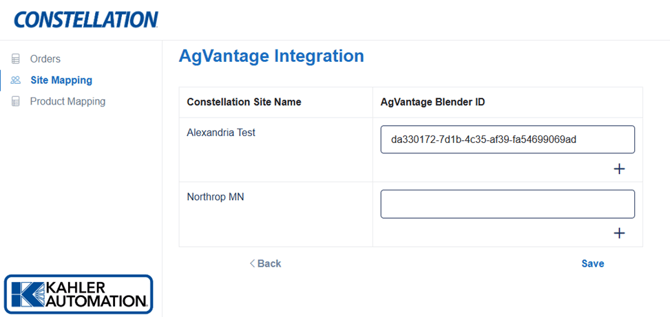
Each registered site should be mapped to a site in AgVantage in order for orders to flow. Sites will be mapped according to their unique AgVantage BlenderID identifier, similar to the one shown above.
Add additional mappings to a site by clicking the “+” button next to each site name, then fill out the BlenderIDs to match AgVantage.
Remove a mapping by clicking the “-“ button.
Click “Save” to apply changes.
Further Reading
- Constellation AgVantage Integration
- Constellation AgVantage Integration - Product Mapping
- Constellation AgVantage Integration - Customers
- Constellation AgVantage Integration - Orders
- Constellation AgVantage Integration - Branch Mapping
Still Need Help?
Submit an online web ticket or call us at Kahler Automation 507-235-6648 Option 2.