![Logo-RGB-color-solid.png]](https://help.kahlerautomation.com/hs-fs/hubfs/Logo-RGB-color-solid.png?height=40&name=Logo-RGB-color-solid.png)
Found under “Orders” on the left-hand navigation bar, this page gives visibility to the flow of orders between AgVantage and Constellation. Each tab on this page will display orders in various categories.
VRT Orders
AgVantage allows for exactly one mix group on orders. Orders may include additional straight product, but only a single compartment may be configured with multiple products.
Details
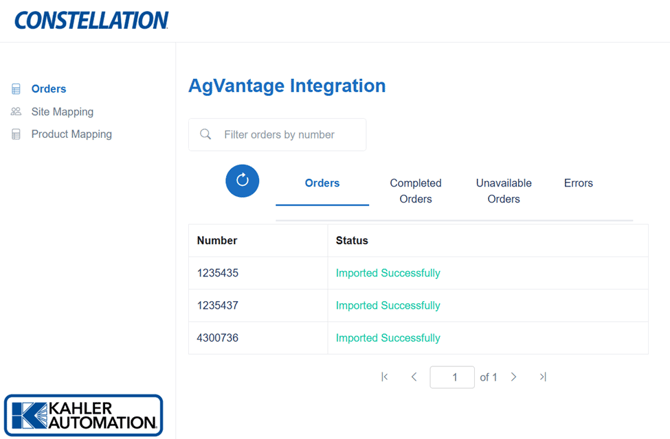
The Orders section lists all orders currently active in the system.
Orders received will use the pick number when imported. If no pick number is included, the system defaults to the order number.
The Completed Orders section contains all orders succesfully exported. Some exceptions may be included in this list of exported errors, such as orders marked invoiced in AgVantage before it was completed. Nominally this list will be successful exports. See Constellation AgVantage Integration - Manually Mark Orders as Exported for further information.
The Unavailable orders section lists orders excluded by a filter. Filters include:
- Products with a “Type” in AgVantage set to “misc/service“
Note: These flags and options come directly from AgVantage.
The Errors section is all orders which encountered an error preventing import. Retry options are provided to manually retry, or automatic retry will occur regularly. Errors include:
- Products using a Unit of Measure other than the allowed list:
- "FLOZ" => Fluid Ounce
- "KG" => Kilogram
- "GAL" => Gallon
- "GL" => Gallon
- "MT" => Metric Ton
- "OZ" => Ounce
- "PT" => Pint
- "LB" => Pound
- "LBS" => Pound
- "QT" => Quart
- "TON" => Ton
Tip: Manually mark orders as exported. See this article for details about the process and reasons: Constellation AgVantage Integration - Manually Mark Orders as Exported
Further Reading
- Constellation AgVantage Integration
- Constellation AgVantage Integration - Site Mapping
- Constellation AgVantage Integration - Product Mapping
- Constellation AgVantage Integration - Customers
Still Need Help?
Submit an online web ticket or call us at Kahler Automation 507-235-6648 Option 2.