![Logo-RGB-color-solid.png]](https://help.kahlerautomation.com/hs-fs/hubfs/Logo-RGB-color-solid.png?height=40&name=Logo-RGB-color-solid.png)
After the AgVantage integration is connected, products must be mapped from AgVantage to Constellation. To get started, first create products and recipes in Constellation. Information about Constellation Products can be found here. Information about Constellation Recipes can be found here.
Products are mapped by their AgVantage ProductIDs.
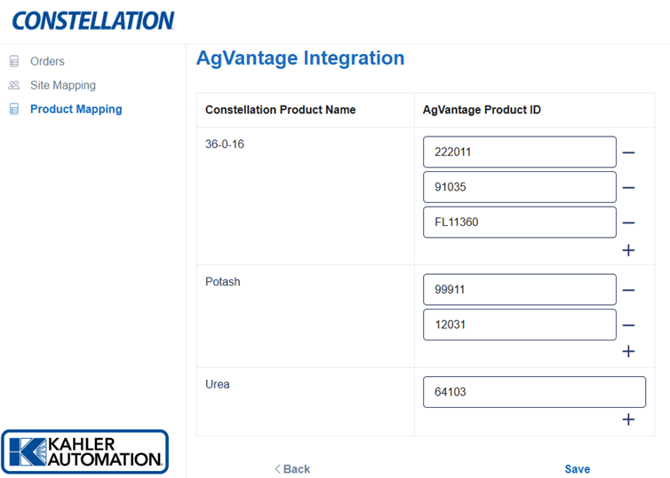
Map a product by filling in the AgVantage Product ID next to the product.
Add additional mappings to a product by clicking the “+” button next to each product name, then fill out the AgVantage Product ID.
Once all Constellation products have a mapping to an AgVantage product, click “Save” at the bottom of the page to apply all changes. Products without a mapping cannot be imported and will block orders until a Constellation product is mapped to all products on an order.
Further Reading
- Constellation AgVantage Integration
- Constellation AgVantage Integration - Site Mapping
- Constellation AgVantage Integration - Customers
- Constellation AgVantage Integration - Orders
- Constellation AgVantage Integration - Branch Mapping
Still Need Help?
Submit an online web ticket or call us at Kahler Automation 507-235-6648 Option 2.