![Logo-RGB-color-solid.png]](https://help.kahlerautomation.com/hs-fs/hubfs/Logo-RGB-color-solid.png?height=40&name=Logo-RGB-color-solid.png)
Applies to
- Terminal Management TMX
The Receipts page gives access to a chronological list of past tickets. To review tickets based on order see Finding Past Orders in Terminal Management TMX.
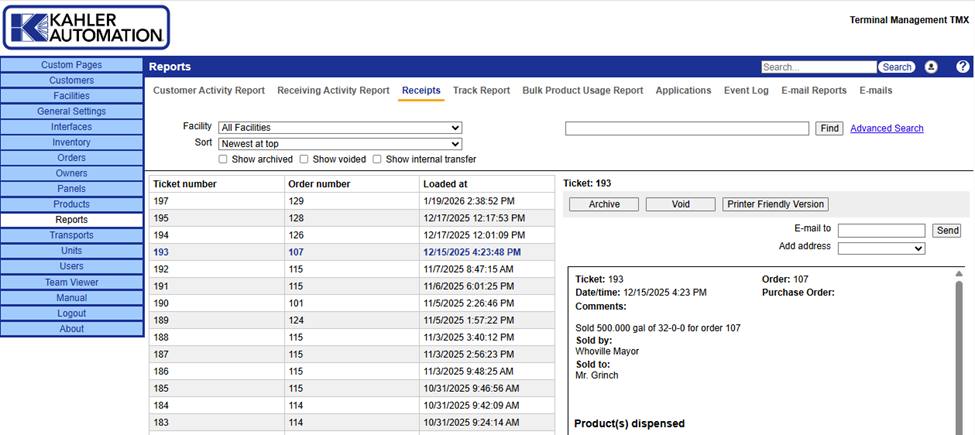
Useful as a means to reprint or manage recent tickets, the Receipts page gives users access to a location’s past tickets. Tickets capture details of a load operation, but their display may be altered by current delivery ticket configuration. See Ticket Customization.
Viewing a Ticket
Access the Receipts page by clicking the “Reports” section in the blue navigation bar in Terminal Management TMX. Receipts is the default page for the Reports section.
The Receipts page provides a table of Ticket Number, Order Number, and Loaded at. Click any ticket listed to display ticket details on the right side of the screen.
Tickets can be filtered by facility, which is useful if a database is shared between two or more facilities. If more specific filters are needed, a search bar is provided at the top of the screen, along with a link to access an advanced search.
By default, archived, voided, and internal transfer tickets are excluded from the list. Enable “Show Archived”, “Show voided” or “Show internal transfer” to include these tickets in the list.
Click “Printer Friendly Version” above a ticket to open a new tab with the selected ticket for printing. If email is configured for Terminal Management TMX, the ticket can be directly sent by email by entering the destination address and clicking “Send”.
Manage Tickets
Users may need to archive or void certain tickets. To do so, select the ticket from the listing on the left then click “Archive” or “Void” to apply the status to the ticket.
Voided tickets cannot be reversed. Voiding a ticket reverses inventory changes due to the loading.
Still Need Help?
Submit an online web ticket or call us at Kahler Automation 507-235-6648 Option 2.