![Logo-RGB-color-solid.png]](https://help.kahlerautomation.com/hs-fs/hubfs/Logo-RGB-color-solid.png?height=40&name=Logo-RGB-color-solid.png)
Following an unexpected restart, Plant Supervisor PSX attempts to recover dispensement data and create a ticket. This process only occurs when Plant Supervisor PSX is interrupted while dispensing an order, something that should not happen in normal circumstances.
System behavior when Plant Supervisor PSX unexpectedly restarts depends on what other equipment has restarted. Controllers can continue dispensing the current portion of an order, and the recovery process described here lets the delivered amounts be recorded to a ticket. But if the controllers have also restarted, PLCs immediately perform a fail-safe operation, stopping pumps and closing valves.
When Plant Supervisor PSX detects that it has been shut down unexpectedly, it checks the system for in-progress data. In-progress data can be found in a connected controller, pulling the latest value available, and also checks the in-progress records in the database. The operator is presented with a screen where they can choose either the database record or the controller records for each product to generate a ticket for the previously dispensed product.
Use Recorded Quantity: Use the value for product dispensed as recorded on the in-progress record for creating the ticket.
Use Panel Quantity: Use the last value from the Controller/Panel when creating the ticket. This value may be zero if the controller was restarted or “Handle later” was previously clicked.
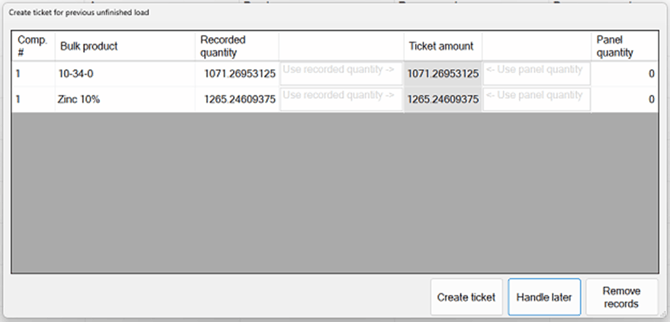
Shown here is an example of the in-progress record being the only available source for creating the ticket. This can occur due to the controllers being power-cycled or the “Handle later” button being pressed previously.
Operators can also choose to discard the in-progress data or to handle later. In all cases, Kahler Automation recommends choosing "Create ticket”; otherwise, information is lost. Kahler Automation does not recommend choosing to handle later, which may result in control records being discarded.
Create ticket: Use the Ticket Amounts selected above and record the amounts as a ticket.
Handle later: Skip and handle on the next Plant Supervisor PSX restart. Not recommended, as panel quantity read from the controller is only available on the first presentation.
Remove records: Remove the in-progress record. A ticket will not be created and the quantity will be forgotten.
Operators are able to void tickets later if the order was discarded or the values were inaccurate.