![Logo-RGB-color-solid.png]](https://help.kahlerautomation.com/hs-fs/hubfs/Logo-RGB-color-solid.png?height=40&name=Logo-RGB-color-solid.png)
Applies to
- Plant Supervisor PSX
Prepare load shortcuts vary depending on configuration of Plant Supervisor PSX, and some may apply to specific systems. Their purpose is to simplify operator workload by automating specific actions when preparing an order for loadout.
Show or hide shortcuts from the Configuration > Options > Prepare Load Shortcuts section. Shortcuts that will not be used at a facility should be hidden to eliminate confusion.
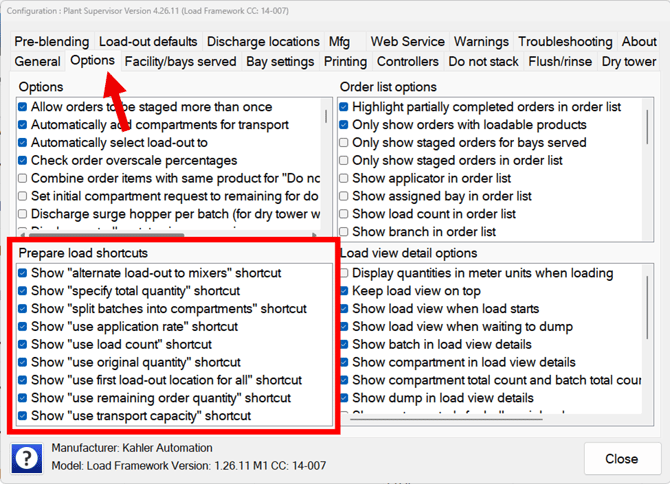
Options
Alternate load-out to mixers: When selected, the discharge locations used in each compartment are set to alternating dry tower mixer discharge locations starting with the one selected for the first compartment. It attempts to use mixers assigned to the same bay, if possible.
-
Intended for use with dry systems featuring a pair of mixers.
Specify total quantity: When selected, a numeric keypad appears prompting for the total quantity to be loaded. After clicking the “OK” button on the numeric keypad, the entered quantity is distributed over the load compartments.
Split batches into compartments: When selected, compartments that would be split into more than one batch are split into separate compartments for each batch. This option requires that the “load-out to” is specified for each compartment.
Use application rate: When selected, the total quantity to be dispensed for the load is calculated using the order application rate and the total number of acres specified for the load. The total quantity is then distributed proportionally over all the specified compartments utilizing the transport and compartment capacities.
- Dependent on compatible interface which includes acres in the order data. Operator must specify acres while preparing the load.
Use load count: When selected, the total quantity to be dispensed for the load is calculated using the order total requested, divided by the number of requested loads for the order. The total quantity is then distributed proportionally over all the specified compartments utilizing the transport and compartment capacities.
- Dependent on compatible interface which includes load count in order data. Original order amount is divided by the load count.
Use original order quantity: When selected, the total quantity to be dispensed for the load is set as the order total requested. The total quantity is then distributed proportionally over all the specified compartments utilizing the transport and compartment capacities.
Use remaining order quantity: When selected, the total quantity to be dispensed for the load is calculated as the difference between the order total requested and total delivered. The total quantity is then distributed proportionally over all the specified compartments utilizing the transport and compartment capacities.
Use first load-out location for all: When selected, the discharge location selected for the first compartment is used for all the load compartments.
Use transport capacity: When selected, the total quantity to be dispensed for the load is calculated as the total capacity of the selected transports. The total quantity is then distributed proportionally over all the specified compartments. The amount assigned does not take into consideration the order quantity.
- Requires transport to be selected.
- Transports with compartments configured will utilize compartment capacity.
- Transports without compartments will utilize max weight in conjunction with empty weight to determine capacity.
Still Need Help?
Submit an online web ticket or call us at Kahler Automation 507-235-6648 Option 2.