![Logo-RGB-color-solid.png]](https://help.kahlerautomation.com/hs-fs/hubfs/Logo-RGB-color-solid.png?height=40&name=Logo-RGB-color-solid.png)
Applies to
- Terminal Management TMX
Although pre-set during facility commissioning, panels include four settings operators should be aware of. These settings affect the operation of panels in relation to each other and may be part of contamination controls on a site.
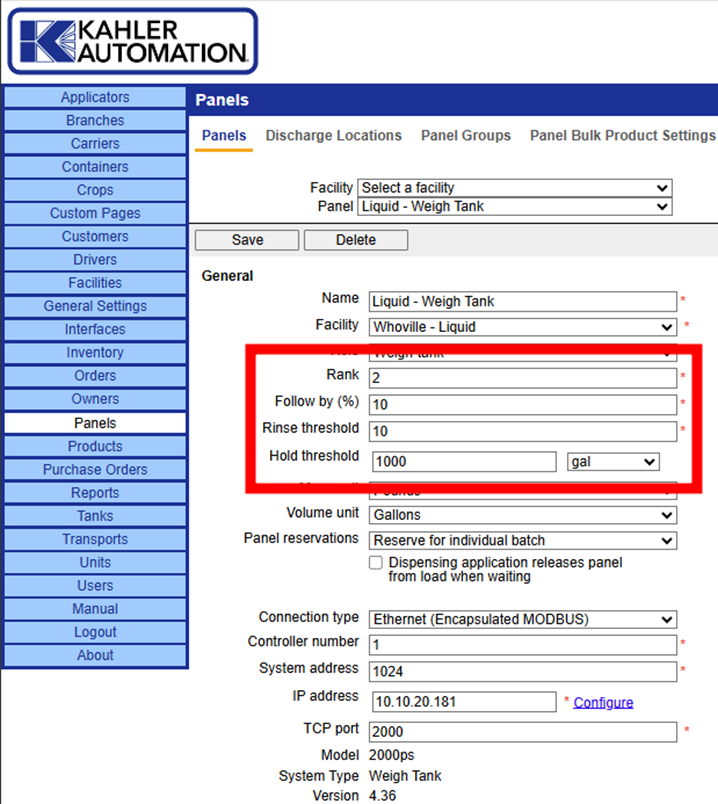
Rank: Sets the relative order of panels and informs the other settings described here; do not change. In the example above, Rank 2 tells the system that this panel should follow the Carrier, which is Rank 1.
Follow by (%): Applies to panels following other panels. When the prior panel reaches the percent delivered for the first product, this panel automatically starts.
Note: In dry systems, the auto-start happens when the discharge phase of the weigh hopper reaches the percent configured. This is used to delay the chem injection until some product is in the mixer.
Caution: In liquid systems, this is part of contamination controls, ensuring injecting systems are run into an operating carrier.
Info: Plant Supervisor PSX may be configured to follow the LAST product instead of the first. This is uncommon.
Rinse threshold: Sets the point when the rinse function is triggered according to the scale reading. A higher value starts the rinse function earlier; a smaller one delays the start of the rinse. Only applicable to weigh tank systems.
Hold threshold: Applies to panels leading other panels, such as the carrier system. If following panels have not completed their operation when this panel reaches the remaining amount set here, the panel pauses until they have completed.
Note: Hold thresholds should be large enough for a carrier to resume and reach full rate before they reach anticipation and start their finish procedures. A hold threshold set too low may result in under-delivery.
Still Need Help?
Submit an online web ticket or call us at Kahler Automation 507-235-6648 Option 2.