![Logo-RGB-color-solid.png]](https://help.kahlerautomation.com/hs-fs/hubfs/Logo-RGB-color-solid.png?height=40&name=Logo-RGB-color-solid.png)
Orders may be assigned to a selection of connected sites. Orders are a dispensement request consisting of a customer, and one or more products or recipes. Additional information may be recorded.
Most orders will be created via API or integration connection to a customer’s ERP/Agronomy software, but manual orders can be created for testing or other reasons as needed.
Actions
Edit
An available orders which have not had a transaction recorded.
Open the order for editing. Some changes may be disallowed. Products on an order do not allow changing the product or unit, but can be removed or new products added.
View
A read only view of the selected order that includes detailed information of its configuration. Only available after an order has at least one transaction recorded.
Complete
Active orders in Constellation may be marked complete from the Order page. This then closes the order and reports dispensed amounts to the interface, if any. Completed orders cannot be re-opened but can be reviewed.
Remove
Orders may be removed. Removing an order results in the site marking the order complete if it has been dispensed or otherwise deleted. Constellation then deletes its entry.
Assign sites
Site assignment allows an order to be configured for one or more sites. Integration- and API-created orders will commonly only be assigned to one site.
View Transactions
All dispense operation create transactions that are recorded to Constellation. Transactions include all recorded information including amount dispensed, loaded at time, and more. Transactions can also be voided if required.
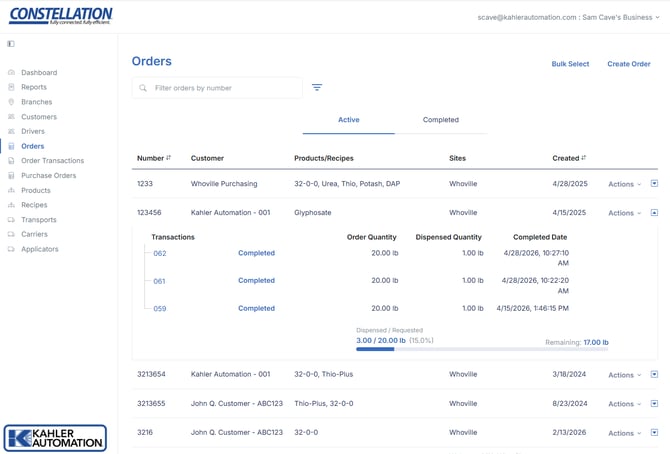
Summary View
Orders can be expanded by clicking the arrow shown at the far right of each row. The summary view displays a list of transactions tied to the order, in addition to a order completion status bar at the bottom. Order completion percentage can be configured under Constellation - Order Settings.
Still Need Help?
Submit an online web ticket or call us at Kahler Automation 507-235-6648 Option 2.