![Logo-RGB-color-solid.png]](https://help.kahlerautomation.com/hs-fs/hubfs/Logo-RGB-color-solid.png?height=40&name=Logo-RGB-color-solid.png)
Applies to
- Weigh tank sub-systems
Settings on the Dispenser Settings screen tend to be configured during commissioning and do not need further adjustment unless conditions change.
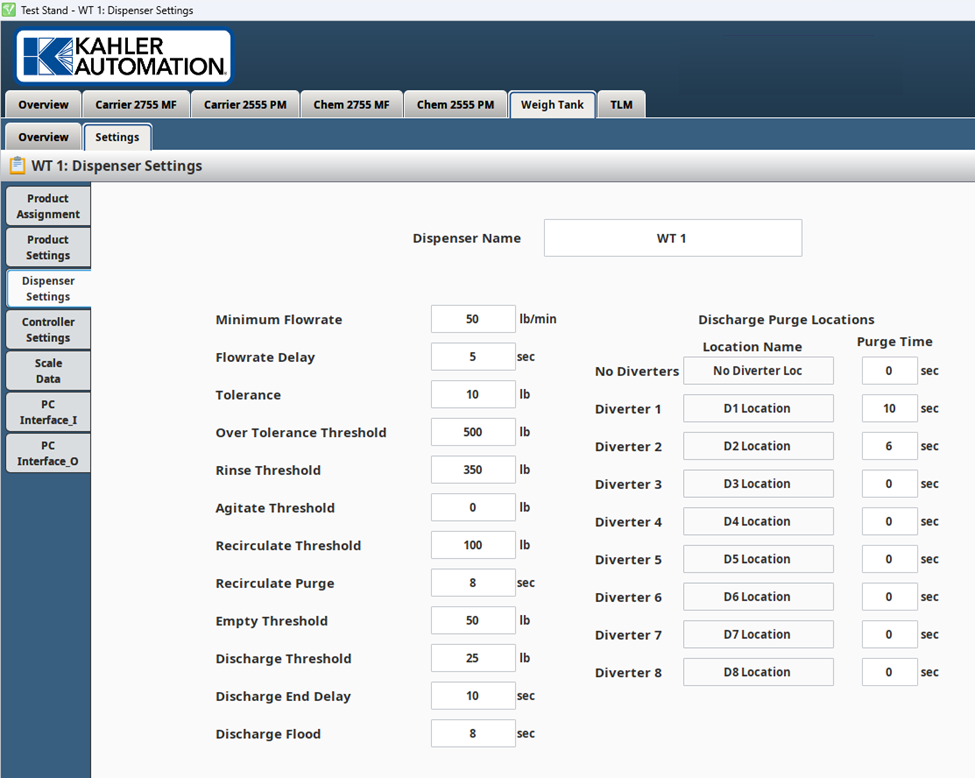
Dispenser Name
A customizable setting that allows the user to assign a specific name to the weigh tank or liquid blender based on their facility's layout or preference (e.g., "North Weigh Tank").
Minimum Flowrate
A configurable flowrate threshold used during the discharge of the weigh tank or liquid blender. If the flowrate falls below this value and remains low for a specified time delay (flowrate delay), the controller triggers an alarm and indicates no weight change.
Flowrate Delay
A configurable time associated with the Minimum Flowrate. If the flowrate remains below the Minimum Flowrate for this duration, the controller triggers an alarm and indicates no weight change.
Tolerance
Under-delivery Acceptance:
- Remaining amount ≤ Anticipation: The remaining amount to be dispensed must be less than or equal to the anticipation setting.
- Remaining amount ≤ Tolerance: The remaining amount must also be less than or equal to the defined tolerance value.
- If both conditions are met, the product is considered complete. This means that the delivery is finished, even if there is a slight under-delivery, as long as it falls within the acceptable tolerance level.
Continuation of Dispensing:
- If the product dispensing equipment supports bumping and bumping is enabled, or the dispensing process is stopped with a remaining amount that is greater than the sum of the tolerance and anticipation, the following rules apply:
- Remaining amount ≥ Tolerance: If the remaining amount to be dispensed is greater than or equal to the tolerance setting, the product continues to dispense. In other words, the system keeps dispensing until the difference is within the acceptable tolerance range or until the full requested amount is met.
- Tolerance for Smaller Requested Amounts: If the requested amount is less than the anticipation setting, the system still uses tolerance to complete the order. This occurs because the system can’t dispense less than the anticipation setting.
Tolerance for Smaller Requested Amounts:
- If the requested amount is less than the anticipation setting, the system still uses tolerance to complete the order. This occurs because the system can’t dispense less than the anticipation setting. The controller warns the operator before the dispensing begins.
Over Tolerance Threshold
If the difference between the delivered amount and the requested amount exceeds the over-tolerance threshold, a warning is displayed to alert the operator that too much product was dispensed.
Rinse Threshold
When discharging the tank, if the Scale Gross weight is less than or equal to the Rinse threshold, the Rinse output is activated.
Recirculate Threshold
The minimum Scale Gross weight required to initiate recirculation. This ensures there is sufficient product in the tank to begin the recirculation process.
Recirculate Purge
The duration the controller will purge the recirculation line after completing a recirculation operation.
Empty Threshold
- The weight value at which the weigh tank is considered empty.
- When starting an order, the system checks the Scale Gross weight. If the weight is greater than or equal to this setting, a "Weight on Scale" message is displayed.
Discharge Threshold
The discharge process begins its end delay when the Scale Gross weight is less than or equal to this setting.
Discharge End Delay
After reaching the Discharge Threshold, the system continues discharging for the specified amount of time, ensuring any remaining product is fully discharged.
Discharge Flood
The amount of time the discharge pump waits before starting, after the valves have been opened. This delay ensures that the pump does not run dry, allowing time for the system to fill with product before the pump engages.
Discharge Purge Locations
- The system supports 9 discharge purge locations, which include No Diverters and Diverter 1-8 with standard programming.
- Location Names: Allows the user to assign a specific name to each discharge location.
Purge Time
Enables the user to configure and adjust the discharge purge time for each specific discharge location.
Manual Discharge
- Determines automatic dispensing behavior for each specific discharge location.
- Disabled: The system automatically dispenses, i.e. into a storage tank after manufacturing.
- Enabled: System requires an operator to confirm a transport is connected and ready to receive, i.e. by clicking “Start Compartment 1”.
Still Need Help?
Submit an online web ticket or call us at Kahler Automation 507-235-6648 Option 2.