![Logo-RGB-color-solid.png]](https://help.kahlerautomation.com/hs-fs/hubfs/Logo-RGB-color-solid.png?height=40&name=Logo-RGB-color-solid.png)
Applies To
- FLEXCOMMAND Dry Towers
- Plant Supervisor PSX
Overview
Plant Supervisor PSX can suspend an active load on a FLEXCOMMAND dry tower so that a higher priority load can be dispensed without canceling the load already underway. Suspending clears the controllers and releases them; the suspended order can be resumed after the higher priority load is out of the way.
This is built for situations in which a high-priority transport arrives mid-operation. Without suspension, control of the surge hopper cannot be safely transferred between orders, so the arriving transport must wait for the current load to finish.
An order can be suspended only when all of its controllers are idle. The controllers go idle once the batches already underway finish and no further compartment or batch starts, so the operator first holds the order (see "Plant Supervisor PSX - Hold on Compartment and Batch") to stop the next one from starting.
Controller Reservations
Without suspension, an order in progress keeps a reservation on the controllers it uses, such as the weigh hoppers, the mixer, and the surge hopper; no other order can use them. Suspending the order releases the reservation so another order can run.
Suspending a Load
The "Suspend Load" button becomes available once the order is being held and all controllers are idle. Until then, hovering over the button lists the controllers that aren’t idle yet, followed by "are not idle". The operator can also read the weigh hopper controllers' state at the top left of each weigh hopper graphic on the Loadout screen.
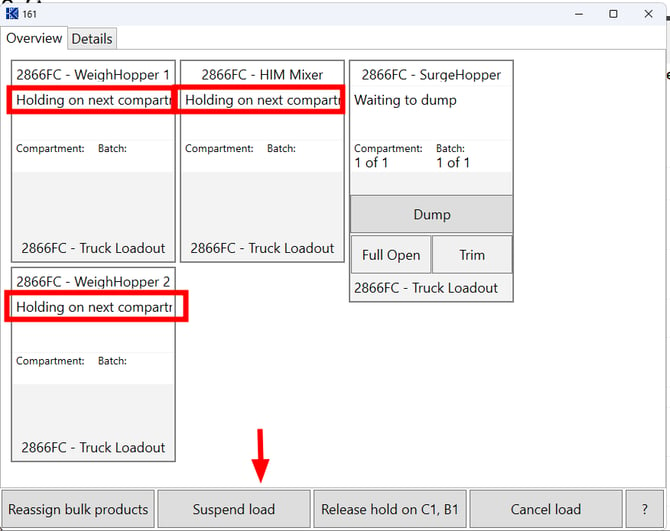
Suspending puts the order into suspension, clears the controllers, and releases them so that another order can be run. The order itself is not canceled, and controllers on a suspended order report their status as "Busy..." on the load view details window (See below).
With the controllers released, the higher priority order can claim them and dispense while the first order sits suspended.
Note: Suspending requires the Surge Low Level Delay to be set on the FLEXCOMMAND HMI. Otherwise product may be left in the surge hopper when another order takes it, and mix into that order. See "FLEXCOMMAND - Surge Low Level Delay".
Resuming a Suspended Load
To resume a suspended order, the operator selects "Resume load". The order reserves all of the controllers it requires and then resumes dispensing from where it was held.
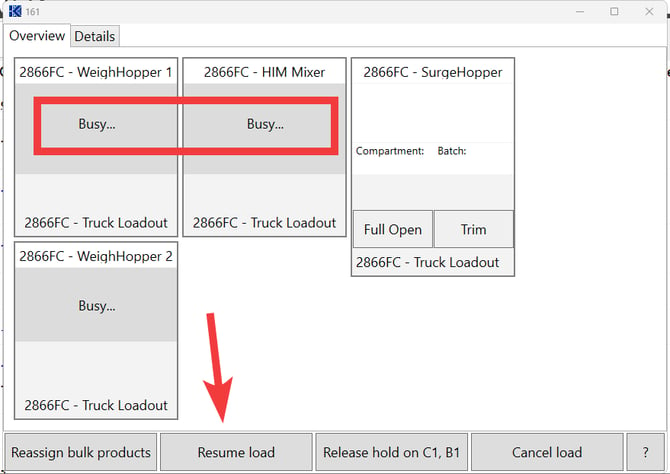
If the tower is not idle at that moment, the resumed order waits. It waits until the order that is currently dispensing either completes or is itself suspended, at which point the required controllers become available and the resumed order continues.
Further Reading
- Plant Supervisor PSX - Hold on Compartment and Batch
- FLEXCOMMAND - Reassign Bulk Products
- FLEXCOMMAND - Surge Low Level Delay
- Plant Supervisor PSX - Panels
Still Need Help?
Submit an online web ticket or call us at Kahler Automation 507-235-6648 Option 2.