![Logo-RGB-color-solid.png]](https://help.kahlerautomation.com/hs-fs/hubfs/Logo-RGB-color-solid.png?height=40&name=Logo-RGB-color-solid.png)
Product settings can vary by system. Listed here are all settings, although only some may be used for a sub-system.
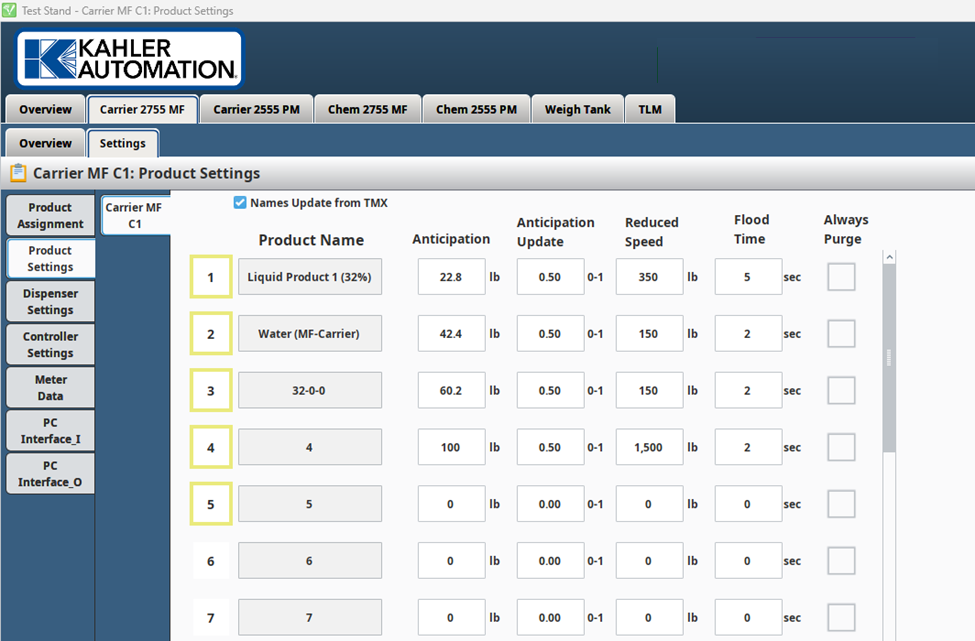
Names Update from TMX
If the box is checked, the product names are grayed out and are updated from TMX. Updates occur only when either PSX or SS2 is assigned to the controller, and the application is started.
If the box is not checked, the user can name the products on the HMI.
Product Highlights
All products selected for a controller in the product assignment page should show a highlighted product number.
Product Name
Displays Product Name for each product number.
- If Names Update from TMX is unchecked in Product Settings, product name editing is allowed.
- If Names Update from TMX is checked, the product names are grayed out, and are updated from TMX.
Anticipation
Anticipation predicts the amount of product dispensed while the system is stopping, helping prevent overshooting the requested amount.
For example, if an order is for 1000 lbs. of product and anticipation is set to 200 lbs., the pump will initially run for 800 lbs. (1000 – 200 = 800.) The pump then shuts off, and the expected 200 lbs. of free-flowing product during the stop completes the 1000 lbs. order.
Adjustment
- If too much product is dispensed, anticipation should be increased.
- If too little is dispensed, anticipation should be decreased.
Anticipation Update
This setting allows the system to automatically dial-in anticipation based on any dispensing error.
The recommended value for the anticipation update factor is 0.5, meaning that the anticipation automatically adjusts by half of the error value once an order is completed.
A setting of 0 disables automatic correction of anticipation, meaning the system will not update anticipation based on dispensing errors.
Reduced Speed
This setting can be used to turn on a low flow valve or slow down a variable speed motor near the end of the order. A low flow valve and/or a variable speed motor may not be present on all systems.
Minimum Flowrate
A configurable flowrate threshold used during the dispensement of product. If the flowrate falls below this value and remains low for a specified time delay (flowrate delay), the controller triggers an alarm and indicates no weight change.
Flood Time
Configurable flood time that allows a valve to open and flood the fill pump prior to starting the pump.
Purge Time
Configure and adjust the discharge purge time for each specific Product. Requires purge equipment to be utilized.
Always Purge
If checked, the controller always purges after dispensing this product. Controllers always purge on the last product to dispense.
Hand Add
If checked, this product is considered a hand-add (not automatically dispensed) and the user must select “complete” in Plant Supervisor PSX.
Eductor
- This setting would be checked for a product (ingredient) intended to be added through the eductor. If checked, the eductor is turned on when this product is requested.
- This is typically used on liquid blenders for hand-add products.
Enable Bump
When dispensing dry product, once the system is near the set-point, it is sometimes necessary to quickly open and close the product gates, allowing small amounts of product to fall on the scale to reach the set-point without overshooting. This process is called bumping.
This would not be used on a weigh tank but could be used on a liquid blender for dry products where the equipment supports bumping.
Open Time
This is the amount of time a gate is opened when bumping. This setting is only available if Enable Bump is selected for a product.
Close Time
This is the amount of time a gate is closed when bumping. This setting is only available if Enable Bump is selected for a product.
Still Need Help?
Submit an online web ticket or call us at Kahler Automation 507-235-6648 Option 2.