![Logo-RGB-color-solid.png]](https://help.kahlerautomation.com/hs-fs/hubfs/Logo-RGB-color-solid.png?height=40&name=Logo-RGB-color-solid.png)
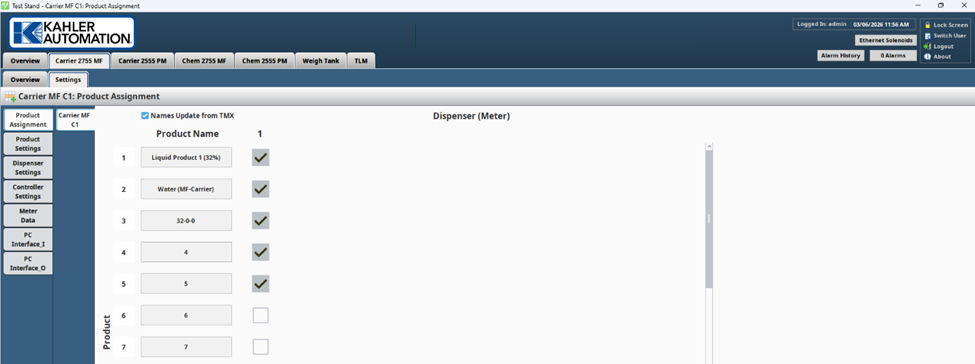
Product Numbers
Product numbers are listed in the leftmost column.
- Product numbers 1 - 32 are useable in Terminal Management TMX Panel Bulk Product Settings.
- Hand Add (product 0) is also included, and useable as part of build-up batch process.
Product Name
Displays Product Name for each product number.
- If Names Update from TMX is unchecked in Product Settings, allows editing the product name.
- If Names Update from TMX is checked, the product names are grayed out, and the product names are updated from TMX.
Bin columns
Number of columns shown as configured in Controller Settings. At least 1 column is shown.
Product to Bin Configurations
Each checkbox allows the product to be assigned to a bin. Mouse-over text should appear showing: "Product Name" / "Bin Number" ("Dispenser Name").
- If checked, the product is dispensed by the bin.
- If unchecked, the product is disabled.
Still Need Help?
Submit an online web ticket or call us at Kahler Automation 507-235-6648 Option 2.