![Logo-RGB-color-solid.png]](https://help.kahlerautomation.com/hs-fs/hubfs/Logo-RGB-color-solid.png?height=40&name=Logo-RGB-color-solid.png)
Found under “Branch Mapping” on the left-hand Navigation bar.
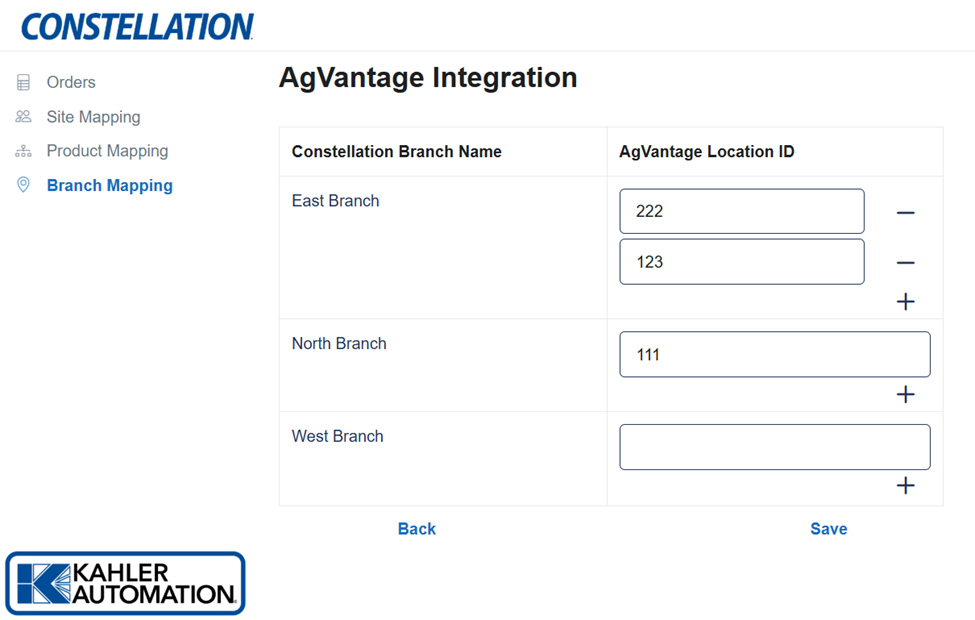
Each AgVantage Location ID should be mapped in order for it to be used on imported orders. Locations are mapped based on their unique Location ID in AgVantage, similar to the one shown here.
Add additional mappings to a branch by clicking the “+” button next to each site name, then fill out the Location ID to match AgVantage.
Remove a mapping by clicking the “-” button.
Click “Save” to apply changes.
Further Reading
- Constellation AgVantage Integration
- Constellation AgVantage Integration – Site Mapping
- Constellation AgVantage Integration – Product Mapping
- Constellation AgVantage Integration – Customers
- Constellation AgVantage Integration – Orders
Still Need Help?
Submit an online web ticket or call us at Kahler Automation 507-235-6648 Option 2.