![Logo-RGB-color-solid.png]](https://help.kahlerautomation.com/hs-fs/hubfs/Logo-RGB-color-solid.png?height=40&name=Logo-RGB-color-solid.png)
Found under “Site Mapping” on the left-hand navigation bar.
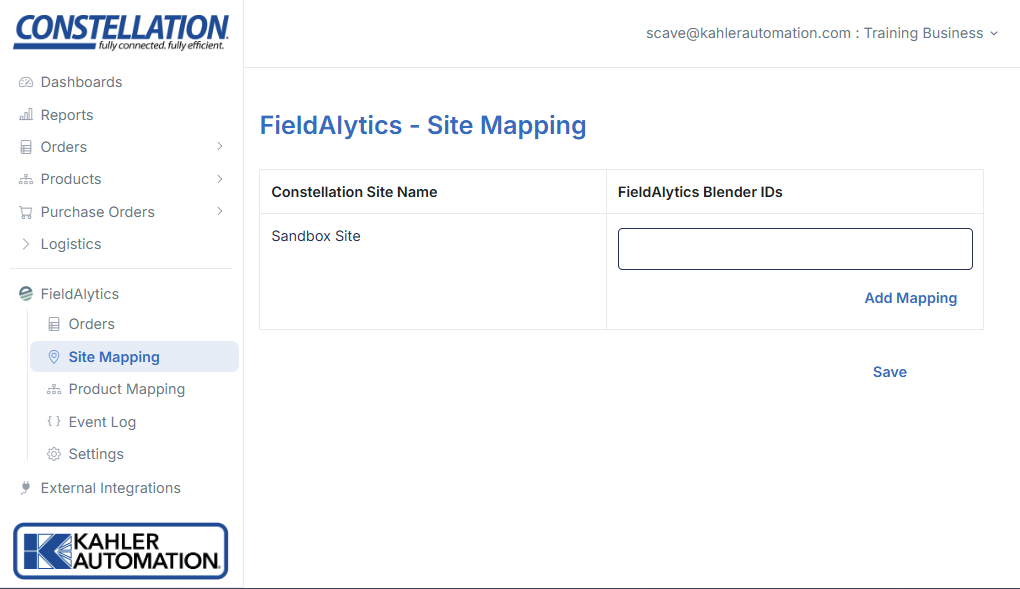
Each registered site should be mapped to a site in FieldAlytics in order for orders to flow. Sites are mapped according to their unique FieldAlytics BlenderID identifier, similar to the one shown above.
Add additional mappings to a site by clicking the “+” button next to each site name, then fill out the BlenderIDs to match FieldAlytics.
Remove a mapping by clicking the “-” button.
Click “Save” to apply changes.
Further Reading
- Constellation FieldAlytics Integration
- Constellation FieldAlytics Integration - Orders
- Constellation FieldAlytics Integration - Product Mapping
- Constellation FieldAlytics Integration - Event Log
- Constellation FieldAlytics Integration - Settings